Back Ground Knowledge
 LAN | A LAN (Local Area Network) is a network located on one site, where all the computers are geographically close to each others. (Like this school) |
 Star Network | A network topology defines the layout of a network. A star topology is where all computers and other devices are all connected to a central node (switch) |
 Internet | The Internet is a global computer network providing a variety of information and communication facilities, consisting of interconnected networks using standardized communication protocols. |
 Router | A router is needed to connect a LAN to a WAN (or to the Internet). A router scans data packets and redirects them towards the LAN or towards other routers depending on their origin and their destination. |
 Firewall | A firewall is a network component that usually “sits” just after the main router. It scans all incoming traffic to identify/block and report potential security threats coming from “outside |
 Switch | A switch is a network component used to connect multiple devices together in a star topology. |
 WAP | A Wireless Access Point (WAP) is a network component used to connect multiple devices together without using wires. |
 Server | A server provides services and storage to devices and users on a network |
 Laptop | A laptop is a small, portable personal computer designed for mobile use, typically featuring a “clamshell” design with a screen on the inside of the lid and a keyboard on the base |
Network Design Skills
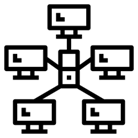
Star Network
Star Network
Nearly all modern networks have a STAR topology. (have a start shape)
At the centre of the STAR is a Switch

Switch
Switch
A switch is a network component used to connect multiple devices together in a star topology.
The Switch is at the centre of the STAR

Wireless Access Point
Wireless Access Point
A Wireless Access Point (WAP) is a network component used to connect multiple devices together without using wires.
A WAP is connected to a Switch to allow wireless devices to connect to a wired network

Server
Server
A server provides services and storage to devices and users on a network
A Server is connected to a Switch to provide services and storage to other devices on the network
Laptop
Laptop
A laptop is a small, portable personal computer designed for mobile use, typically featuring a “clamshell” design with a screen on the inside of the lid and a keyboard on the base
Laptops are connected to a network wirelessly. So you need a dotted line (wireless) between the laptop and the Wireless Access Point

Router
Router
A router is needed to connect a LAN to a WAN (or to the Internet). A router scans data packets and redirects them towards the LAN or towards other routers depending on their origin and their destination.
The Router needs to connect to the Switch to allow other network devices access out of the LAN and onto another network ( perhaps the internet)

Firewall
Firewall
A firewall is a network component that usually “sits” just after the main router. It scans all incoming traffic to identify/block and report potential security threats coming from “outside
The Firewall will be connected to the Router and will be connected to another network, sometimes the internet

Internet
Internet
The Internet is a global computer network providing a variety of information and communication facilities, consisting of interconnected networks using standardized communication protocols.
On a network diagram the internet is usually connected to the firewall