KNOWLEDGE
1.0 Systems analysis and development
1.1 the concept of project management, including:
Project management involves planning, scheduling, budgeting, and tracking to ensure project goals are met efficiently and effectively. Here’s a breakdown of these key concepts.
1.1.1. planning
Definition: Planning establishes the project’s direction and sets goals.
Resources: Assess resources needed, such as human resources, hardware, and software.
Objectives: Define clear, measurable project goals.
Scope: Determine what is included in the project and what is excluded (scope creep management).
Stakeholders: Identify all involved parties (team members, clients, etc.) and their roles.
1.1.2. scheduling
Definition: Scheduling outlines when tasks should start and finish.
Tools: Use tools like Gantt charts, Kanban boards, or software like Microsoft Project to visualize the schedule.
Task Breakdown: Divide the project into smaller, manageable tasks (Work Breakdown Structure – WBS).
Timeline: Create a timeline to visualize task durations and dependencies.
Milestones: Set significant checkpoints or milestones to measure progress.
1.1.3. budgeting
Definition: Budgeting involves estimating costs and allocating financial resources.
Approval: Present the budget for approval from stakeholders or management.
Cost Estimation: Estimate costs for each task, considering resources, time, and operational expenses.
Financial Planning: Align budget with project goals, outlining how funds will be allocated across different phases.
Contingency Plans: Prepare for unexpected expenses by allocating a contingency budget (usually a percentage of the total budget).
1.1.4. tracking
Definition: Tracking monitors progress to ensure adherence to the plan.
Adjustments: Be prepared to make adjustments to the plan or schedule based on tracking insights to keep the project on course.
Progress Monitoring: Regularly check the status of tasks against the timeline and objectives.
Performance Metrics: Establish key performance indicators (KPIs) to measure project success (e.g., completion rates, cost variance).
Reporting: Create regular reports for stakeholders to update them on project status, including successes and any issues encountered.
1.2 types of system development methodologies
1.2.1. Prototyping
Prototyping is the essential process of creating an early, tangible, or digital model of a product, service, or system to test concepts, gather user feedback, and refine designs before final production.Key Aspects of Prototyping:
Benefits: It facilitates team communication, encourages experimentation, ensures user needs are met, and provides a “rough draft” to visualize final outcomes.
Purpose: The primary goal is to save time and money by validating ideas early, identifying design flaws, and reducing risks before investing in full-scale development.
Types of Prototypes:
Basic, quick, and cheap, such as paper sketches or mockups, used to communicate core concepts and test user flow without focusing on design details.
Detailed, interactive, and functional, mimicking the final product’s appearance, branding, and UX for final testing before launch.
Prototyping Process: It is an iterative cycle involving building, testing, learning, and refining, which can be applied to physical products, software applications, or service experiences.
The System Development Life Cycle (SDLC) is a step-by-step process for designing, building, testing, and launching information systems. It helps ensure the systems are high quality, cost-effective, and meet business goals. The stages usually include planning, analysis, design, development, testing, deployment, and maintenance, often following a straight-line order.
1.2.2. system development life cycle (SDLC)
sdfsdfsd
1.3 stages of the SDLC
1.3.1. Preliminary Analysis
Purpose: To determine whether the project is viable and worth the investment.
Key Activities:
Define the Problem: Identify why the current system isn’t meeting needs.
Feasibility Study (TELOS):
Technical: Does the technology exist to build this?
Economic: Is the budget sufficient? (Cost-benefit analysis).
Legal: Does it comply with the Privacy Act 1988?
Operational: Will users support and use the new system?
Scheduling: Can it be completed by the required deadline?
Deliverable: Feasibility Report.
1.3.2. Analysis
Purpose: To define the precise requirements of the new system.
Key Activities:
Data Gathering: Use interviews, surveys, and observation of the current system.
Modeling: Create Context Diagrams (using Yourdon/DeMarco notation) to define system boundaries.
Requirements Specification: Define Functional (what it does) and Non-functional (security, speed) requirements.
Deliverable: Requirements Specification Document.
1.3.3. Design
Purpose: To create the blueprint for the system’s architecture and interface.
Key Activities:
Logical Design: Use Pseudocode and Flowcharts to plan the logic.
Physical Design: Design user interfaces (Wireframes), database structures (Data Dictionaries), and hardware specs.
Test Plan: Create a strategy for how the system will be verified.
Deliverable: System Design Specification.
1.3.4. Development
Purpose: To build the actual software and hardware components.
Key Activities:
Coding: Programmers write the source code based on the design.
Hardware Acquisition: Purchasing and setting up servers or devices.
Unit Testing: Testing individual parts of the code for bugs.
Deliverable: Working Prototype / Alpha Version.
1.3.5. Implementation
Purpose: To deploy the system and switch over from the old one.
Key Activities:
Conversion Strategies:
Direct: Immediate switch (High risk).
Parallel: Old and new run together (Low risk, expensive).
Phased: Replacing parts of the system bit by bit.
Pilot: Testing in one department before full rollout.
User Training: Providing manuals and workshops for staff.
Deliverable: Installed System & User Manual.
1.3.6. Evaluation and Maintenance
Purpose: To monitor, repair, and improve the system over time.
Key Activities:
Post-Implementation Review: Does the system meet the original goals?
Maintenance Types:
Corrective: Fixing bugs.
Adaptive: Updating for a new OS.
Perfective: Adding new requested features.
Deliverable: Evaluation Report.
1.4 systems development documentation as a part of the SDLC – Michael, Zeming
1.4.1. context diagrams using Yourdon/DeMarco notation – Alex
What is a Context Diagram?
A context diagram is a high-level Data Flow Diagram (DFD) that shows:
- The entire system as one process
- External entities interacting with the system
- Data flows going in and out
It shows the system’s boundaries.
Yourdon/DeMarco Notation Symbols
Process
- Drawn as a circle
- Represents the whole system
- Label with system name (e.g. “Library System”)
External Entity
- Drawn as a rectangle
- Represents people or external systems
- Examples: Customer, Admin, Bank System
Data Flow
Must be labelled (e.g. “Order details”, “Payment info”)
Drawn as an arrow
Shows movement of data
Rules for Context Diagrams
- Only ONE process (the whole system)
- No data stores shown
- All data flows must be labelled
- Show only external interactions
- Arrows must show direction of data movement
- Entities must be outside the system boundary
Purpose
- Defines system scope
- Identifies stakeholders
- Clarifies inputs and outputs
- Helps prevent scope creep
- Used in the Analysis stage of the SDLC
1.4.1. context diagrams using Yourdon/DeMarco notation – SCSA – Comp Sci ATAR instructions – Nadia
SCSA – Computer Science ATAR instructions
Context Diagram
A context diagram provides a visual tool to demonstrate the flows of data to and from a system to people or organisation outside of the system (known as external entities).
Context diagrams show the external entities (in rectangles), the system (in a circle) and the flows of data (lines with arrow indicated direction of data flow).
The context diagram allows us to understand the part of the system we have control over. We look further into the system when we look at the level 0 DFD (explained below). We can control aspects within the system but have no control over the external entities that interact with our system.
| External Entity | An external entity is something that is outside of the control of the system. External entities are a person or an organisation and is represented as a singular noun. |
| System | The system is represented by a circle and always ends in the word ’system’. The circle indicates the system boundary. The processes exist within the scope of the project while the external entities are outside of the control of the system. |
| Data Flows | Data flows are represented by a line with an arrowhead. The arrow indicates the direction of flow of the data. The label on the line MUST indicate data rather than the actual physical representation. The easiest way to satisfy this is to use the keyword ‘details’ after each data flow. E.g. ‘receipt’ is not valid as it is a real, physical piece of paper where ‘receipt details’ indicates the data that is on the receipt. |
Rules
- MUST include the word ‘system’ when labelling the system
- End each data flow with the word ‘details’
- Context diagram DOES NOT show processes or data stores inside the system
- The circle for the system represents the system boundary
Example:
Fred’s Seafood has decided to implement a new digital online ordering system. It will allow their customers easy access to their products as well as provide automation for their deliveries and seafood ordering processes.
- Customers go to Fred’s Seafood website and provide their login details to access the website. These details are checked against existing customers from the Customer database. If their login is successful, they can proceed on to order their seafood.
- Customers then browse through the selection of seafood and place an order using the website. The system generates an invoice which is then displayed to the customer on the screen. A copy of the order is saved into the Order database.
- The customer provides payment for the order using their credit card and the system sends a receipt of payment to the customer via email. The order database is updated with the customer payment details.
- Fred’s Seafood kitchen staff read a screen showing the current order. They prepare the order as requested. Once completed they verbally inform the waitstaff the food is ready to be delivered.
- Fred’s Seafood use an external delivery driver to get the food to the customer. When the driver arrives, staff hand them a delivery list with the order details including the address of the customer retrieved from the customer database. The delivery driver emails Fred’s Seafood once the delivery has been completed. Fred’s Seafood staff then send an email through to the customer confirming that the order has been delivered. The order database is updated with the delivery confirmation details and the stock levels are updated in the stock level database.
- At the end of each day, the manager of Fred’s Seafood checks the stock levels from the stock level database and places an order for any seafood required. The manager sends the seafood order through to their supplier and saves a copy of the seafood stock order in the Stock Order database.
- Each month the seafood supplier sends an invoice to Fred’s Seafood detailing the orders for the month. Fred’s Seafood checks the invoice against the orders it has on record in the Stock Order database and, if correct, sends through payment to the supplier.
Answer
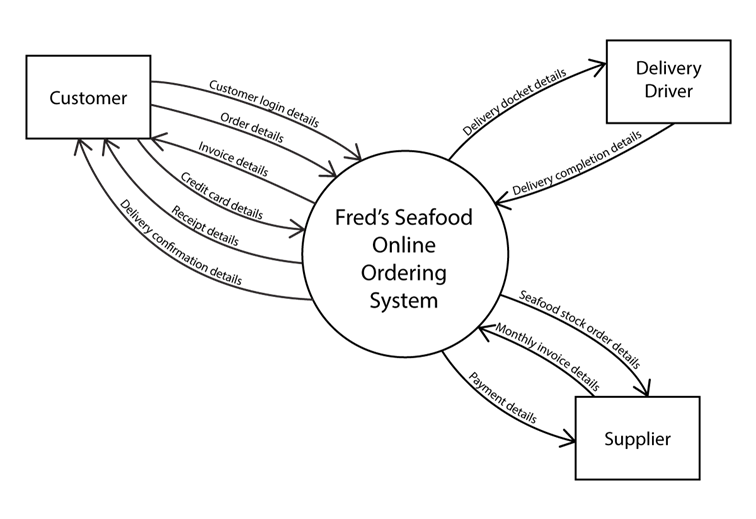
1.5 computer system hardware and software
1.6 the concept of boot process
The boot process is the sequence of operations that starts when you power on a computer and ends when the operating system (OS) is fully loaded and ready for use.
Main Steps
- Power On Self-Test (POST)
Pressing the power button supplies electricity to components like the CPU and RAM. The firmware (BIOS or UEFI on the motherboard) runs POST to check hardware integrity—testing memory, CPU, and peripherals. If issues arise, it signals with beeps or error codes - Boot Device Selection
Firmware scans devices in boot order (e.g., USB first, then SSD) for bootable media containing the OS boot loader, often in the Master Boot Record (MBR) or GUID Partition Table (GPT) - Bootloader Execution
The bootloader (e.g., GRUB for Linux, Windows Boot Manager) loads into memory. It identifies the OS kernel, loads it into RAM, and passes control to it - Kernel Initialization
The kernel (OS core) sets up memory management, initialises drivers for hardware, and mounts the file system to access files - System Services and User Interface
The kernel launches essential services (networking, security), user applications, and finally displays the login screen or desktop
Types of booting:
Cold – From when the power is fully turned off
Warm – Restart without the full power cycle
1.7 storage capacities
1.7.1. bit
1.7.2. byte
1.7.3. kilobyte
1.7.4. megabyte
1.7.5. gigabyte
1.7.6. terabyte
1.8 appropriate hardware components for a computer system designed for a specific purpose:
1.8.1. input
1.8.2. output
1.8.3. processing
1.8.4. storage
Primary
Secondary
1.9 the role of the standard operating environment (SOE)
1.10 functions of the components of the central processing unit (CPU)
The CPU is the “brain” of the computer, responsible for processing instructions and managing the flow of data. Below are the primary functions of its key components:
1.10.1. arithmetic logic unit (ALU)
The ALU performs all the mathematical and logical operations within the CPU.
Logical: Conducts comparisons (AND, OR, NOT) and decision-making processes, such as determining if one number is greater than another.
Arithmetic: Performs calculations such as addition, subtraction, multiplication, and division.
1.10.2. control unit (CU)
The CU acts as the coordinator of the CPU. It does not process data itself but directs the flow of data between the CPU and other devices.
Regulation: Sends control signals to the ALU, registers, and memory to tell them how to respond to an instruction.
Instruction Decoding: Deciphers instructions fetched from memory.
1.10.3. registers
Registers are small, high-speed storage locations internal to the CPU. They hold data that is being processed immediately.
Function: They temporarily store instruction addresses, data being operated on, and the results of calculations before they are sent to the main memory (RAM).
Speed: They are the fastest type of memory in the computer system.
1.10.4. program counter
The PC is a specific register that tracks the execution of a program.
Sequencing: It automatically increments (increases) after each fetch cycle to ensure the program runs in the correct order.
Next Instruction: It holds the memory address of the next instruction to be fetched and executed.
1.10.5. system clock
The system clock synchronizes all computer operations by emitting regular electrical pulses.
Synchronization: It ensures that all components within the CPU and on the motherboard work in perfect timing with one another.
Clock Speed: Measured in Gigahertz (GHz), it determines how many “Fetch-Decode-Execute” cycles the CPU can perform per second.
1.11 the concept of the fetch-execute cycle – Alex
1.12 troubleshooting strategies:
1.12.1. diagnosis of fault
Identify Symptoms: Observe and note issues (error messages, performance glitches).
Reproduce the Problem: Attempt to recreate the fault to understand conditions.
Gather Information: Collect logs, configurations, and context (recent changes).
Isolate Components: Test individual parts (hardware/software) to pinpoint the issue.
1.12.2. implement a solution
Analyze Solutions: Brainstorm possible fixes; weigh pros and cons.
Select a Solution: Choose the most effective and feasible option.
Test Solution: Apply the fix and monitor for success or further issues.
Follow-Up: Ensure that the problem is resolved and no new issues arise.
1.12.3. document troubleshoot procedure
Troubleshooting Log: Keep a record of symptoms, diagnostics, and actions taken.
Solution Details: Describe the solution step-by-step, including tools used.
Lessons Learned: Note what worked, what didn’t, and potential improvements.
Knowledge Base: Compile common issues/solutions for future reference.
1.13 appropriate physical preventative maintenance measures
Measures you would take to clean your hardware such as:
- Regular cleaning equipment (dust, ventilation, wiring);
- The control of sensitive components (hard drives, batteries);
- Advance replacement of worn parts.
source:
https://www.rzilient.club/en/article/computer-maintenance-ti
1.14 the purpose of an ICT code of conduct
An ICT code of conduct is a set of rules that explains how people are allowed to use computers, networks and the internet in an organisation (like a school or workplace). It usually covers things like using technology safely, respecting others, protecting privacy and data, following laws (for example copyright), and not misusing ICT resources (for example hacking, cyberbullying or accessing inappropriate content).
1.15 ethics in the development and use of ICT systems
Ethics in the development and use of ICT systems is about making sure technology is designed and used in ways that are responsible, fair and legal. It focuses on respecting people’s privacy, protecting data from misuse, avoiding harm (like cyberbullying or scams), following copyright and licence rules, and making sure systems do not unfairly discriminate against anyone
1.16 privacy considerations in the development and use of ICT systems
1.17 digital communications etiquette when using ICT systems
SKILLS
1.0 Systems analysis and development
1.18 analyse context diagrams
1.19 document an existing system
1: The Online Food Delivery App
Scenario: You are designing a context diagram for “QuickBite,” a food delivery system.
- Customers use the app to browse menus and place orders.
- Restaurants receive order notifications and send status updates (e.g., “Preparing,” “Ready for Pickup”).
- The Payment Gateway processes credit card transactions and sends back a confirmation code.
- Delivery Drivers receive delivery tasks and provide GPS location updates.
2: The Smart Library System
Scenario: A local library wants to automate its book tracking.
- Members can search for books, check out items using a barcode, and receive overdue notices via email.
- The Librarian manages the digital catalog by adding or removing book records.
- The system must communicate with a National Book Database to fetch ISBN details and book covers.
3: Hospital Patient Monitoring
Scenario: A specialized software system monitors patients in an Intensive Care Unit (ICU).
- Sensors attached to the patient send continuous heart rate and blood pressure data to the system.
- If vitals fall outside a safe range, the system sends an Alarm Signal to the Nurse’s Station.
- The Medical Database provides the system with the patient’s medical history and current prescriptions.
- Doctors can log in to view real-time reports and set “Alert Thresholds.”
4: The Smart Home Security Hub
Scenario: You are mapping a context diagram for “SafeGuard Home,” a central security controller.
- Homeowners use a mobile app to arm or disarm the system and receive push notifications if an alarm is triggered.
- Motion Sensors and Door Contacts send “Status Signals” to the Hub.
- An External Siren receives a “Trigger Command” from the Hub during a breach.
- The system communicates with a Police Dispatch Service to send emergency alerts and location data.
5: Corporate Payroll System
Scenario: A company uses a “GlobalPay” system to handle employee salaries.
- The Human Resources (HR) Dept enters new hire details and salary scales.
- Employees submit their monthly timesheets and bank account updates.
- The Tax Authority (IRS/ATO) receives quarterly tax reports and payment filings.
- The Company Bank receives a “Direct Deposit File” to execute the actual transfers.
6: Automated Weather Station (IoT)
Scenario: An environmental agency uses a “Remote Weather Monitor” located in a forest.
- Anemometers and Thermometers (Environmental Sensors) provide raw data on wind speed and temperature.
- A Solar Power Controller sends “Battery Level” status to ensure the system doesn’t die.
- The system transmits a “Weather Data Packet” every hour to the Central Research Server.
- Maintenance Technicians can send “Calibration Commands” to the system via a satellite link.